Booking an OPD ticket online before visiting a government hospital in West Bengal can make the registration process much easier, especially at large hospitals and medical colleges where outpatient counters often remain busy.
Through the WB Health OPD Ticket Booking system, patients can complete key parts of the registration process online by selecting the hospital, choosing the required OPD department, entering patient information, selecting an available visit date, and saving the generated ticket before travelling.
This is particularly useful for patients visiting major government hospitals in Kolkata and other districts of West Bengal, where planning the OPD visit in advance can reduce confusion at the hospital and help patients reach the correct department more efficiently.
This guide explains the complete WB Health OPD online appointment process in 2026, including how to book an OPD ticket, choose the right hospital and department, download the ticket, handle common booking problems, and understand what to do after reaching the hospital.
On this pageJump to a section of this patient guide
WB Health OPD Ticket Booking 2026 Overview
The WB Health OPD Ticket Booking 2026 facility helps patients complete outpatient registration online for participating government hospitals in West Bengal. Instead of starting the entire registration process only after reaching the hospital, patients can use the online system to enter their details, choose the hospital and department, select an available date, and generate an OPD ticket in advance.
| Particular | Details |
|---|---|
| Service | WB Health Online OPD Ticket Booking |
| Department | Health & Family Welfare Department, Government of West Bengal |
| Purpose | Online registration for government hospital OPD visits |
| Main Health Department Website | wbhealth.gov.in |
| Online OPD Portal | onlinehmis.wbhealth.gov.in |
| Booking Mode | Online |
| Who Can Use It | Patients visiting participating West Bengal government hospitals |
| Main Requirement | Patient details and an active mobile number |
| OPD Ticket | Generated after successful online registration |
| Availability | Depends on hospital, department, and selected date |
One important point is that the WB Health online OPD system does not mean every hospital, department, doctor, or date will always be available. The booking options shown on the portal depend on the services currently enabled for the selected hospital and the availability for that visit date.
What Is WB Health OPD Ticket Booking?
WB Health OPD Ticket Booking is an online outpatient registration service for patients visiting participating government hospitals and medical institutions in West Bengal.
OPD means Outpatient Department. This is where patients visit a hospital for consultation, examination, diagnosis, treatment, or follow-up care without being admitted as an inpatient.
Through the WB Health OPD online registration system, patients can generally complete several important steps before travelling to the hospital, including:
- Entering patient details
- Selecting the required government hospital
- Choosing an available OPD department
- Selecting an available visit date
- Generating the OPD ticket
- Saving or printing the ticket for the hospital visit
This is especially useful for patients visiting busy West Bengal government hospitals and medical colleges, where completing registration in advance can make the first part of the hospital visit more organised and reduce unnecessary confusion at the OPD registration counter.
Official WB Health OPD Ticket Booking Website
For WB Health OPD Ticket Booking, patients should use the official West Bengal government health platforms and avoid unofficial websites that ask for unnecessary personal details, payment, or unrelated information.
The two main portals are:
West Bengal Health & Family Welfare Department:
Visit the official WB Health website
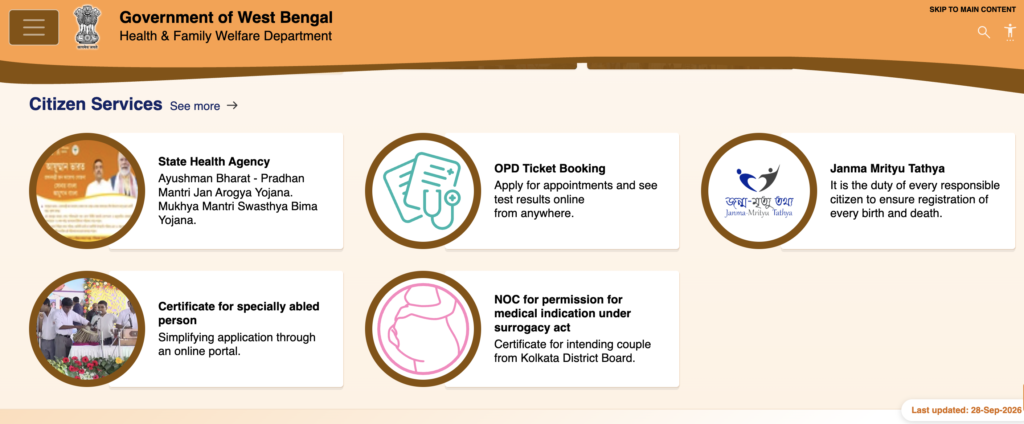
Online HMIS / OPD Registration Portal:
Open the official WB Health Online HMIS portal
For patients who want to book an OPD ticket online, the Online HMIS portal is generally the more direct starting point.
Before entering your mobile number or patient details, always check the website address carefully to make sure you are using the official government portal.
Who Can Use WB Health OPD Ticket Booking?
The WB Health online OPD booking system is meant for patients seeking outpatient services at participating government hospitals and medical institutions in West Bengal.
It can be useful for:
- First-time patients
- Existing patients returning for consultation
- Patients seeking specialist OPD care
- Senior citizens
- Parents or guardians booking for children
- Patients travelling from another district
- People visiting for follow-up treatment
The online system can be especially helpful for patients travelling long distances or those who want to complete part of the registration process before reaching the hospital.
However, availability still depends on the hospital, OPD department, and date selected. Not every service is guaranteed to appear for every hospital.
What You Need Before Booking a WB Health OPD Ticket
Before starting the WB Health OPD online registration, keep the basic patient and visit details ready. This makes the booking process faster and reduces the chance of entering incorrect information.
| Information | Why It May Be Needed |
|---|---|
| Active mobile number | Used for registration, verification, or communication |
| Patient’s full name | Required for OPD registration |
| Age or date of birth | Helps identify the patient correctly |
| Gender | Used in the patient record |
| Address | May be required during registration |
| Hospital name | Needed to choose the treatment facility |
| OPD department | Used to select the required consultation type |
| Previous patient details | Useful for repeat or follow-up visits where applicable |
| Previous prescriptions or reports | Helpful during consultation with the doctor |
Patients should also keep an identity document available for the hospital visit where required.
The exact document requirement can differ from one hospital to another, so patients should follow the instructions shown on the generated WB Health OPD ticket and any hospital-specific guidance.
How to Book WB Health OPD Ticket Online in 2026
The WB Health OPD Ticket Booking process is straightforward when the required hospital and department are available on the portal. The exact screen layout may change slightly, but the overall booking flow remains similar.
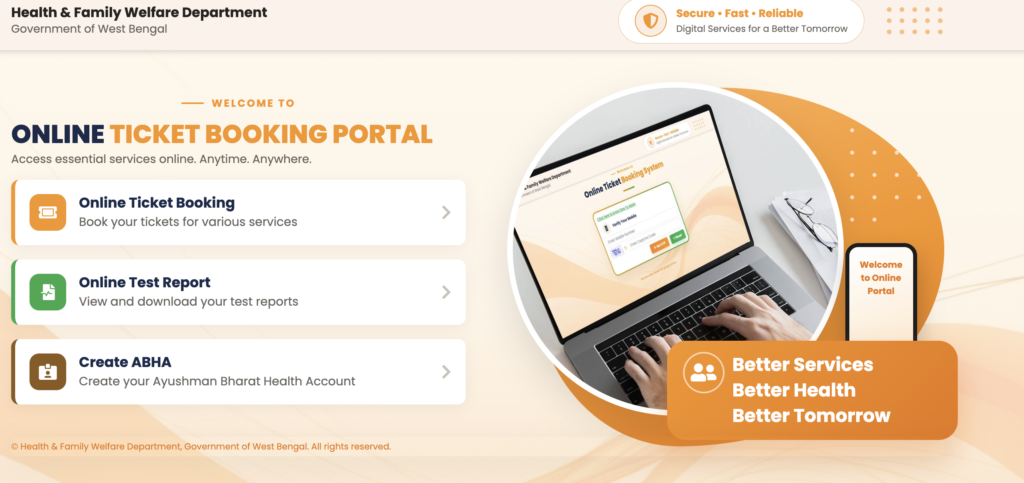
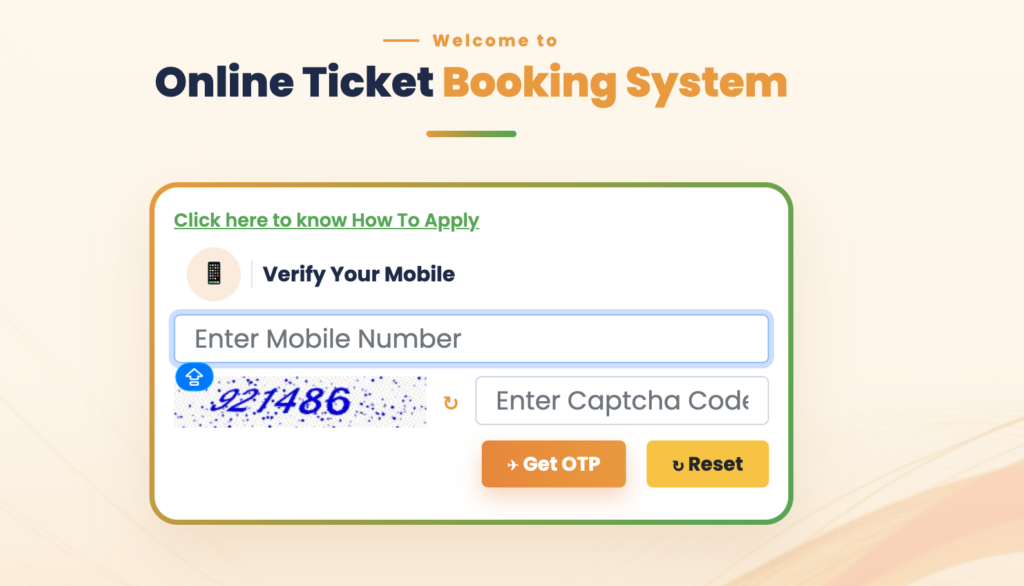
Step 1: Open the official OPD portal.
Visit the official WB Health Online HMIS portal and choose the Online Ticket Booking option. Avoid unofficial websites or advertisements that ask for unnecessary information or payment.
Step 2: Start patient registration.
Enter the details requested on the booking page. Depending on the current portal flow, you may be asked for a mobile number, existing patient information, or other registration details before continuing.
Step 3: Select the hospital.
Choose the West Bengal government hospital where the patient wants treatment. Only hospitals currently enabled on the portal will appear, so every government hospital may not always be available for online booking.
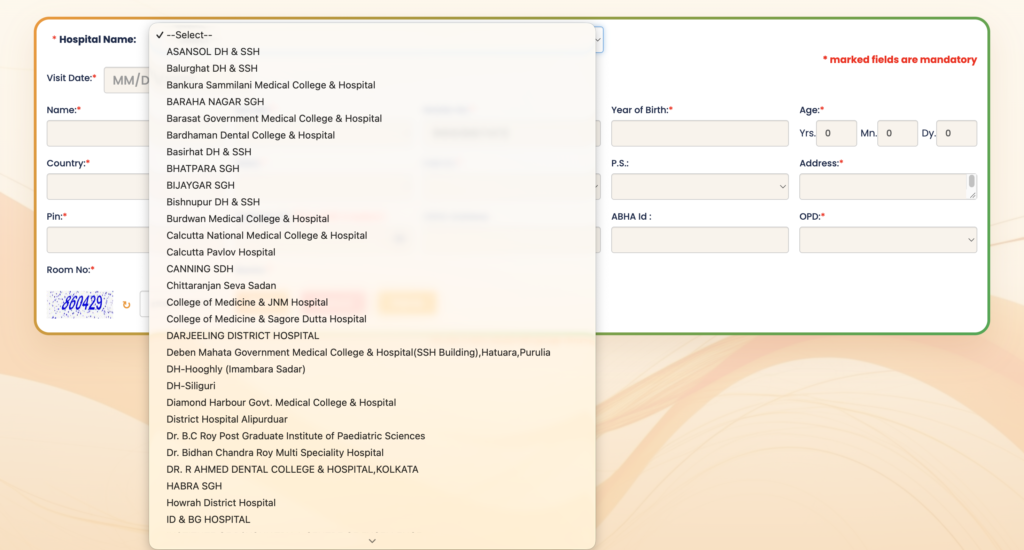
Step 4: Enter the patient details.
Fill in the required information carefully, which may include:
- Patient name
- Age or date of birth
- Gender
- Address or location
- Mobile or contact number
Use the patient’s actual details because incorrect information can cause problems during verification at the hospital.
Step 5: Choose the OPD department.
Select the department that matches the patient’s medical requirement. Depending on the hospital, available options may include General Medicine, Orthopaedics, ENT, Dermatology, Ophthalmology, Surgery, and other specialties.
Do not choose an unrelated department only because your preferred department is unavailable.
Step 6: Select an available visit date.
Choose from the dates shown by the system. If your preferred date is not available, it may mean that online booking is closed for that day, the department is not running online registration, or the available capacity has already been filled.
Step 7: Review the booking details.
Before submitting, check the:
- Patient name
- Hospital
- Department
- Visit date
- Mobile number
- Other information shown on the screen
Correcting an error before confirmation is much easier than discovering it after reaching the hospital.
Step 8: Confirm the OPD booking.
Complete the final registration step and wait for the system to confirm that the booking has been created successfully. If the portal is slow, avoid pressing the submit button repeatedly.
Step 9: Download the WB Health OPD Ticket.
Once the ticket is generated, save it immediately. You can keep the PDF on your phone, take a screenshot as a backup, send a copy to a family member, or print it before the hospital visit.
What Information Is Shown on the WB Health OPD Ticket?
The exact ticket layout can vary, but the generated WB Health OPD ticket may include:
| Ticket Detail | What It Means |
|---|---|
| Patient Name | Name entered during registration |
| Patient / Registration ID | Identification generated or linked by the system |
| Hospital | Government hospital selected for consultation |
| Department | OPD specialty chosen during booking |
| Visit Date | Date selected for the hospital visit |
| Registration Information | Details used by hospital staff to identify the booking |
| Instructions | Additional directions generated with the ticket |
For reporting time, doctor name, room number, or counter details, follow the information printed on the ticket or displayed by the hospital rather than relying on a generic online guide.
WB Health Online OPD Booking for Major Government Hospitals in West Bengal
The WB Health online OPD booking system is used for outpatient registration across participating government hospitals, medical colleges, and other public healthcare institutions in West Bengal.
Patients frequently search for online OPD ticket booking for major hospitals such as:
- IPGME&R and SSKM Hospital
- NRS Medical College & Hospital
- Medical College Kolkata
- R.G. Kar Medical College & Hospital
- Other government medical colleges
- District hospitals
- State-run government hospitals
However, hospital availability on the portal can change, and not every department may be enabled for online booking at all times.
The live WB Health OPD portal should always be treated as the final source for checking whether a hospital, department, or visit date is currently available.
If a hospital does not appear in the official selection list, do not assume that a third-party website or agent can provide a genuine WB Health OPD appointment. In that situation, check the hospital’s current registration process or contact the hospital directly for guidance.
Do You Need to Print the WB Health OPD Ticket?
Carrying a printed WB Health OPD ticket is useful because hospital staff can check it quickly during registration or verification. However, patients should also keep a digital copy saved on their phone as a backup.
For a smoother hospital visit, it is practical to carry:
- Printed OPD ticket
- Digital copy of the ticket on your phone
- Valid patient identification
- Previous prescriptions
- Previous test reports
- Current medicines or a medicine list, where relevant
The exact verification process can differ from one hospital to another, so patients should be prepared to show the ticket at the registration, help desk, or department counter before consultation.
What to Do After Reaching the Hospital With an Online OPD Ticket
Booking a WB Health OPD ticket online does not always mean you can go directly to the doctor’s room.
In many government hospitals, patients still need to complete a short verification or routing process after arrival. Staff may check the online registration, confirm the department, and direct the patient to the correct OPD unit.
A practical hospital-day flow is:
Step 1: Reach the hospital with enough time.
Avoid arriving at the last moment, especially at large medical colleges or busy district hospitals where walking between counters and departments can take time.
Step 2: Keep your OPD ticket ready.
Have the printed or digital copy available before entering the registration or verification area.
Step 3: Ask where online-ticket patients should report.
If the process is not clearly marked, ask the enquiry desk, help desk, or security staff.
Step 4: Complete any required verification.
The hospital may need to validate the online ticket before sending you to the consultation area.
Step 5: Locate the correct OPD department.
Follow the hospital signage or staff instructions carefully.
Step 6: Wait according to the hospital’s patient flow.
Online booking can simplify registration, but it does not necessarily remove the consultation queue.
Step 7: Meet the doctor when your turn comes.
Keep previous prescriptions, reports, and relevant medical records ready.
Step 8: Save all new prescriptions and investigation slips.
These can be important for tests, pharmacy visits, referrals, and future follow-up appointments.
The key point is that online OPD registration reduces one part of the hospital process, not every queue inside the hospital. Patients may still need to wait for consultation, tests, pharmacy services, or specialist procedures.
How to Choose the Correct OPD Department
Selecting the correct WB Health OPD department is important because booking the wrong specialty can delay treatment or waste a hospital visit.
Common departments may include:
| OPD Department | Common Type of Care |
|---|---|
| General Medicine | General adult health problems and initial medical evaluation |
| Pediatrics | Illnesses and healthcare needs of children |
| Orthopaedics | Bone, joint, muscle, and injury-related problems |
| ENT | Ear, nose, and throat conditions |
| Dermatology | Skin, hair, and related conditions |
| Ophthalmology | Eye-related problems |
| General Surgery | Conditions requiring surgical evaluation |
| Obstetrics & Gynaecology | Pregnancy and women’s reproductive health |
| Psychiatry | Mental health consultation |
| Pulmonary / Chest Medicine | Lung and respiratory conditions |
These examples are only for general guidance. Symptoms do not always point clearly to the right specialty.
If you are unsure which department to choose, General Medicine or the appropriate general OPD can often be a better starting point than selecting a highly specialised department based only on guesswork.
If the patient has a medical emergency, severe symptoms, or a rapidly worsening condition, do not wait for routine OPD booking. Use the hospital’s emergency service instead.
How to Download or Save WB Health OPD Ticket in 2026
After completing WB Health OPD Ticket Booking 2026, save the generated ticket before closing the browser or leaving the confirmation page.
On a mobile phone, you can usually:
- Open the generated WB Health OPD ticket
- Use the browser’s Download, Save, or PDF option
- Store the file in your Downloads or Documents folder
- Take a screenshot as an additional backup
If you plan to print the ticket later, rename the file clearly, for example:
WB-OPD-Ticket-PatientName-Date
This is especially useful when one family member manages online OPD bookings for multiple patients.
Lost Your WB Health OPD Ticket in 2026?
If you accidentally delete or misplace the downloaded ticket, do not immediately create another OPD booking.
First check:
- Phone Downloads folder
- Browser download history
- PDF or Documents folder
- Screenshots
- WhatsApp or email, if you shared the ticket
- Any booking confirmation or registration details you saved earlier
If the WB Health OPD portal provides a reprint or ticket-retrieval option, use the registration information requested there.
Creating a second booking without checking the original can lead to duplicate registrations or confusion at the hospital.
WB Health OPD Registration Not Found
If your WB Health OPD registration 2026 cannot be found after booking, the issue may be related to the details entered or an incomplete booking session.
Possible causes include:
- Patient information entered differently during retrieval
- Incorrect mobile number
- Booking not finally confirmed
- Browser session ending before completion
- Temporary portal issue
- Wrong registration or patient details used while searching
Before starting a new booking, check whether you already have:
- Registration number
- Patient ID
- OPD ticket PDF
- Screenshot
- Confirmation page
If you have a valid ticket PDF, keep it safely and carry it to the hospital.
WB Health OPD Booking OTP Not Received
If the WB Health OPD Ticket Booking 2026 process uses OTP verification and the message does not arrive, try these steps:
- Check whether the mobile number was entered correctly
- Wait briefly before requesting another OTP
- Check your mobile network signal
- Avoid requesting multiple OTPs repeatedly
- Restart the booking only if the session has clearly failed
Heavy traffic on the portal or telecom delays can sometimes slow OTP delivery.
Never share your OTP with an unknown person claiming they can complete the WB Health OPD booking for you.
WB Health OPD Website Not Opening or Loading Slowly
The WB Health Online HMIS portal may occasionally load slowly during periods of high traffic.
If the website is not responding:
- Check your internet connection
- Reload the official portal once
- Try another browser
- Switch between Wi-Fi and mobile data
- Clear an expired browser session if necessary
- Try again later if the server remains unavailable
Always make sure you are using the correct official address:
Avoid similarly named unofficial websites when entering patient information.
No WB Health OPD Appointment Date or Slot Available
If your preferred WB Health OPD appointment date in 2026 is not showing, it does not always mean there is a technical problem.
Possible reasons include:
- Booking for that date has not opened
- Available OPD capacity is already full
- The selected department is not available that day
- The hospital handles that service through a different registration process
- Online registration is temporarily unavailable
If your medical condition allows, check another available date.
Do not select the wrong department simply to obtain an earlier slot.
If the patient needs urgent or emergency medical care, do not wait for a routine online OPD appointment. Use the appropriate emergency service or contact the hospital directly.
Can You Book a WB Health OPD Ticket for a Family Member?
Yes. If you are booking a WB Health OPD ticket for a parent, child, spouse, or another family member, enter the details of the patient who will actually visit the hospital.
Do not use your own patient information unless you are the person receiving treatment.
For children, parents or guardians should enter the child’s details wherever the portal asks for patient information. The mobile number used for OTP, confirmation, or communication can depend on the current booking flow.
Before submitting, double-check the patient’s:
- Name
- Age or date of birth
- Gender
- Mobile/contact details
- Selected hospital
- OPD department
- Visit date
Incorrect patient details can create unnecessary problems during hospital verification.
WB Health OPD 2026 First Visit vs Follow-Up Visit: What Documents Should You Carry?
If you are visiting a West Bengal government hospital OPD for the first time, the documents you carry will be slightly different from those needed for a follow-up consultation. Keeping the right papers ready can make WB Health OPD registration, verification, and doctor consultation much smoother.
For a First WB Health OPD Visit
For a first-time visit, carry documents that help establish your registration and current medical condition:
- WB Health OPD ticket
- Valid identity document
- Previous prescriptions, if available
- Recent blood test, scan, or investigation reports
- Current medicines or medicine list
- Relevant reports from another hospital or doctor
If you have already taken treatment for the same problem elsewhere, bring those records as well. They can help the doctor understand the history of the condition and avoid repeating unnecessary tests.
For a WB Health OPD Follow-Up Visit
For a follow-up visit, previous hospital records become even more important because the doctor may need to compare your current condition with earlier treatment.
Carry:
- Current WB Health OPD ticket
- Previous hospital prescription
- Earlier patient ID or registration number
- Previous investigation reports
- New test reports advised during the last visit
- Discharge summary, where applicable
- Doctor’s follow-up instructions
- Updated list of medicines being taken
Keeping all OPD documents together helps maintain continuity of treatment and makes it easier for hospital staff and doctors to review your case.
For repeat visits, it is useful to keep a single folder containing your WB Health OPD ticket, prescriptions, test reports, patient number, and follow-up papers so everything is ready when you reach the hospital.
Can You Book a Same-Day WB Health OPD Ticket in 2026?
Same-day WB Health OPD booking depends entirely on what the selected hospital and department are offering on the live portal.
Some dates may be available for immediate booking, while others may already be full or not open for online registration.
The best way to check is to select:
Hospital → OPD Department → Available Date
and see what the portal currently displays.
If the same day is not available, choose another suitable date if the patient’s condition allows.
For urgent or rapidly worsening symptoms, do not wait for a routine online OPD slot. Use the appropriate hospital emergency service.
Is WB Health OPD Ticket Booking Free?
Patients should not pay an unofficial website, agent, or individual simply to access the WB Health online OPD booking portal.
The online government portal itself should be used directly for the registration process.
However, an online ticket should not be interpreted as a guarantee that every hospital service is free. Registration charges, investigations, procedures, or other hospital-related charges, where applicable, depend on the hospital and service concerned.
Always follow the fee information provided by the government hospital you are visiting.
Does a WB Health Online OPD Ticket Guarantee Immediate Consultation?
No. A WB Health online OPD ticket helps with outpatient registration, but it does not necessarily guarantee consultation at an exact time.
Actual waiting time can depend on:
- Number of patients present
- Department workload
- Emergency cases receiving priority
- Doctor or unit availability
- Verification procedures
- Internal queue management
- Tests or referrals required before consultation
This is an important distinction.
A government hospital online OPD ticket is not always the same as a private-hospital fixed-time appointment.
The ticket confirms the registration or booking details generated by the system, while the actual consultation follows the hospital’s patient-flow process.
WB Health OPD Booking Tips for a Smoother Hospital Visit
A few simple checks before submitting the booking can prevent many common problems.
Before booking:
- Use only the official WB Health portal
- Enter the patient’s name exactly
- Check the hospital carefully
- Select the medically appropriate department
- Confirm the correct visit date
- Verify the mobile number
- Avoid duplicate bookings
- Save the generated ticket immediately
Before leaving for the hospital:
- Keep both digital and printed OPD ticket copies
- Carry previous prescriptions and medical reports
- Keep patient identification ready
- Carry the registered/contact mobile phone where practical
- Allow enough travel time
After reaching the hospital:
- Ask where online OPD ticket patients should report
- Confirm the correct verification or registration counter
- Check the building and department location before joining a queue
- Follow staff directions
- Keep prescriptions, test slips, and referral papers safely after consultation
Large government hospitals and medical colleges may have multiple OPD buildings, counters, and specialty units. Reaching the hospital early enough to locate the correct department can be more useful than simply arriving at the gate on time.
WB Health OPD Booking Helpline and Support
For broader questions related to the West Bengal Health & Family Welfare Department, patients can use the department’s official contact channels.
WB Health Helpline:
033-2357-6000
Department:
Health & Family Welfare Department, Government of West Bengal
Office:
Swasthya Bhawan, GN-29, Sector V, Salt Lake City, Kolkata
Official Website:
West Bengal Health & Family Welfare Department
For hospital-specific questions such as:
- Doctor availability
- OPD room number
- Department location
- Same-day registration
- Hospital-specific verification
- Specialist schedule
contacting the concerned hospital may be more useful than calling the state-level helpline.
WB Health OPD Ticket Booking 2026 FAQs
What is the official website for WB Health OPD Ticket Booking?
The main online OPD booking portal is:
The main departmental website is:
West Bengal Health & Family Welfare Department
How do I book a WB Health OPD ticket online in 2026?
Open the official Online HMIS portal, enter the required patient information, select an available government hospital, choose the appropriate OPD department, select an available visit date, confirm the registration, and save the generated ticket.
Can I book an SSKM Hospital OPD ticket online?
If IPGME&R / SSKM Hospital appears on the live WB Health OPD portal for the required service, select it and check the departments and dates currently available.
The live portal should be treated as the final source for availability.
Can I book an NRS Hospital OPD ticket online?
When NRS Medical College & Hospital is available through the booking system, patients can select it and continue with the department and date options shown by the portal.
Is Aadhaar mandatory for WB Health OPD booking?
Do not assume that Aadhaar is compulsory for every booking.
Follow the identification fields and requirements displayed by the current portal and the hospital you are visiting.
Is a mobile number required for WB Health OPD booking?
Keep an active mobile number available because the system may use it for verification, communication, OTP, or registration-related information.
Can I show my WB Health OPD ticket on my phone?
A digital copy can be useful, but carrying a printed ticket as well can make hospital verification easier.
Follow the instructions shown on the ticket and any directions given by hospital staff.
What should I do if I lose my WB Health OPD ticket?
First check:
- Downloads folder
- Browser download history
- Screenshots
- Email or WhatsApp
- Saved PDFs
- Registration or patient number
If the portal provides a ticket retrieval or reprint facility, use the required registration details rather than immediately creating another booking.
Why is my WB Health OPD registration not found?
Possible reasons include:
- Incorrect details entered during retrieval
- Wrong mobile number
- Booking not finally confirmed
- Expired browser session
- Temporary portal problem
Check whether you already saved the OPD ticket, registration number, patient ID, screenshot, or confirmation page before creating a new registration.
Why is my preferred OPD department not showing?
The department may:
- Not be available for online booking
- Not operate through the portal on the selected date
- Have reached its booking capacity
- Use a different registration process at that hospital
Do not select an unrelated department just to obtain a ticket.
Can I choose another department if my preferred one has no slot?
It is better to choose the medically appropriate OPD department rather than booking an unrelated specialty simply because a slot is available.
If you are unsure which department is appropriate, seek guidance from the hospital or start with a suitable general OPD where appropriate.
Does an online OPD ticket mean I can directly meet the doctor?
Not necessarily.
Many hospitals require online-ticket patients to complete a verification or routing step before reaching the consultation area.
Ask the enquiry desk, registration counter, or hospital staff where online-booked patients should report.
Is WB Health OPD booking a fixed-time appointment?
Not always.
The ticket confirms your outpatient registration or booking information, but the actual consultation time can vary depending on the hospital’s workload and patient queue.
Can I book a WB Health OPD ticket using a mobile phone?
Yes. The portal can generally be accessed through a smartphone browser.
After booking, save the ticket PDF and keep a screenshot as backup.
Can I book an OPD ticket for my parents or another family member?
Yes, where the portal permits patient registration.
Enter the details of the person who will actually visit the hospital, not the details of the person making the booking.
What should I carry to a West Bengal government hospital OPD?
A practical set of documents includes:
- WB Health OPD ticket
- Patient identification
- Previous prescriptions
- Investigation reports
- Discharge summary, if relevant
- Current medicine list
- Follow-up instructions
WB Health OPD Ticket Booking 2026: Final Patient Checklist
The WB Health OPD Ticket Booking Online system can make government hospital visits more organised by allowing patients to complete part of the registration process before travelling.
The most important steps are simple:
Use the official portal, choose the correct hospital and department, enter accurate patient details, select an available date, and save the generated OPD ticket immediately.
However, online registration should not be confused with guaranteed immediate consultation. Patients may still need to complete verification, locate the correct OPD unit, and wait according to the hospital’s consultation process.
For a smoother visit, keep the OPD ticket, patient ID, previous prescriptions, reports, and relevant medical documents ready. Use the official WB Health Online HMIS portal for booking and follow the instructions printed on the ticket or provided by the hospital.