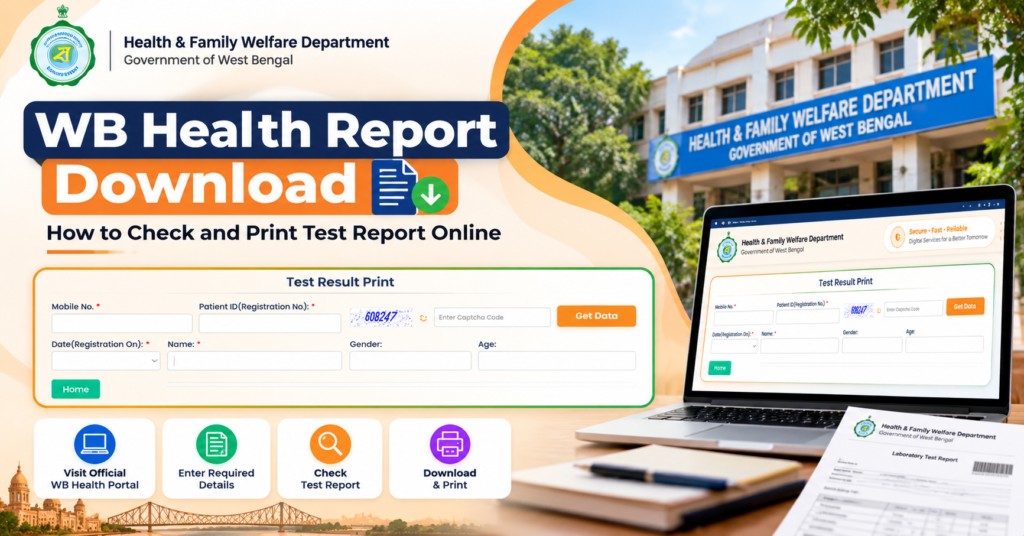
Patients who have completed laboratory or diagnostic tests at participating West Bengal government hospitals may be able to check their available results online through the WB Health Test Result Print service.
The online report facility is especially useful for patients who need their reports for a follow-up consultation, want to keep a digital copy of previous investigations, or are unable to collect the result immediately from the hospital.
However, finding a report is not simply a matter of entering a mobile number. The WB Health report page asks for specific patient-registration information, and those details must match the hospital record correctly.
This guide explains the WB Health Report Download 2026 process using the current Test Result Print page, including what information is required, how to retrieve the report, what to do if the report is not found, and how to save or print the result safely.
On this pageJump to a section of this patient guide
WB Health Test Report Download 2026 Overview
The WB Health online report service is part of the Health & Family Welfare Department’s digital hospital system.
The current Test Result Print page asks patients to provide identifying details before the system retrieves available results.
| WB Health Report Detail | Information |
|---|---|
| Service | Test Result Print |
| Department | Health & Family Welfare Department, Government of West Bengal |
| Purpose | Retrieve available patient test results online |
| Portal | WB Health Online HMIS |
| Main Identification | Mobile Number + Patient ID / Registration Number |
| Other Required Details | Registration Date, Patient Name, Captcha |
| Patient Information Shown | Gender and Age |
| Action | Get Data |
| Useful For | Patients with tests recorded in participating hospital systems |
The important point is that the report portal works using the hospital registration record.
That means the details entered on the Test Result Print page should match the information under which the patient was registered at the hospital.
WB Health Test Result Print Page for Online Lab Reports
Patients who only need to check or print an available WB Health test result do not need to repeat the OPD booking process.
WB Health provides a separate Test Result Print page for retrieving patient test information:
WB Health Test Result Print Page
This page is specifically meant for accessing test-result information linked with an existing patient registration.
Details Required to Check WB Health Test Results
The Test Result Print page currently asks for patient details such as:
- Mobile Number
- Patient ID / Registration Number
- Captcha
- Registration Date
- Patient Name
- Gender
- Age
After entering the required information, use the Get Data option to retrieve the patient record and any test results available through the system.
For a smoother search, keep the Patient ID or Registration Number and the mobile number used during hospital registration ready before opening the page.
How to Download WB Health Test Report Online in 2026
Before checking a WB Health test report online, keep the patient’s hospital registration documents ready. Useful records include the OPD ticket, registration slip, patient card, investigation slip, previous prescription, or discharge papers.
This matters because the report-search page depends on matching the patient’s registration details. Even a small mismatch in the registration number, date, or name can prevent the correct record from appearing.
Step 1: Open the official Test Result Print page.
Use the WB Health report page and check that the browser address belongs to onlinehmis.wbhealth.gov.in before entering patient information.
Step 2: Enter the registered mobile number.
Use the mobile number associated with the patient’s hospital registration, where available.
Step 3: Enter the Patient ID or Registration Number.
The portal specifically asks for Patient ID (Registration No.). Enter the registration number linked to the hospital record under which the test was ordered.
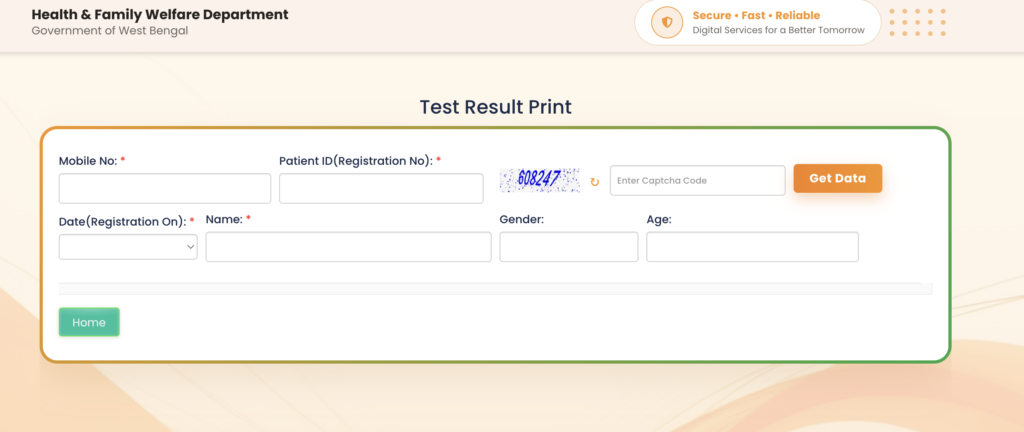
Do not enter another number from the hospital document unless it is clearly identified as the patient or registration number.
Step 4: Enter the captcha.
Type the captcha exactly as displayed. If it is difficult to read, refresh it rather than repeatedly submitting an incorrect code.
Step 5: Select the registration date.
The field is shown as Date (Registration On).
Use the date associated with the patient’s hospital registration. This may be different from the date on which the blood sample, scan, or other investigation was actually performed.
Step 6: Enter the patient’s name.
Use the same spelling that was recorded during hospital registration.
Step 7: Verify the patient details.
The page also uses information such as Gender and Age to help identify the correct patient record.
Step 8: Select Get Data.
After entering the required details, click Get Data.
If the investigation has been completed and the result has been uploaded to the hospital system, the available test information should appear with the retrieved patient record.
How to Find the WB Health Patient ID or Registration Number
The Patient ID / Registration Number is one of the most important details required to retrieve a WB Health test result.
The report page does not rely only on the patient’s name. The registration number connects the search directly with the patient’s hospital record and helps distinguish between patients with similar names.
You may find this number on:
- WB Health OPD ticket
- Hospital registration slip
- Patient card
- Previous prescription
- Investigation slip
- Admission record
- Discharge papers
Look for labels such as:
- Patient ID
- Registration No.
- Registration Number
- Patient Number
If several numbers are printed on the same hospital document, do not guess. Use the number linked to the same registration under which the investigation was prescribed or performed.
Why the Registration Number Is Important
Government hospitals can handle thousands of patient records, and names alone are not always enough to identify the correct person.
The registration number acts as a more precise reference for the patient’s hospital record, which is why entering the correct number is essential when checking an online test result.
Patients who frequently visit West Bengal government hospitals may find it useful to keep a photo or digital copy of the registration slip or OPD ticket so the Patient ID remains easily available for future reports and follow-up visits.
Which Date Should You Enter for WB Health Test Report Download?
On the WB Health Test Result Print page, the date field is specifically labelled:
Date (Registration On)
This means patients should enter the date connected with the hospital registration record, not automatically the date on which the test was performed.
The registration date may be different from:
- Test collection date
- Sample collection date
- Report generation date
- Follow-up appointment date
For example, if the patient registered at the hospital on one day and the investigation was completed later, using the test date instead of the registration date may prevent the system from locating the correct record.
The best approach is to check the patient’s OPD ticket, registration slip, patient card, or hospital record and use the date associated with that registration.
If more than one hospital visit appears in the patient’s records, use the registration date linked to the same visit under which the test or investigation was ordered.on date printed on the hospital ticket or patient document.
WB Health Test Report Not Found: Possible Reasons and What to Check
If a WB Health test report is not showing online, it does not always mean there is a problem with the portal. In most cases, either the patient details do not match the hospital record or the report has not yet been made available in the online system.
Check the Patient Details First
Start by comparing the information entered on the Test Result Print page with the original hospital record.
Recheck:
- Mobile number
- Patient ID / Registration Number
- Registration date
- Patient name
- Captcha
Even a single incorrect digit in the registration number can prevent the system from finding the correct patient record.
The date is especially important. The portal asks for Date (Registration On), so entering the test date or sample-collection date instead of the hospital registration date may return no result.
The Test Result May Still Be Under Processing
A report does not necessarily become available online as soon as the sample is collected.
Depending on the investigation, the hospital laboratory may still need to:
- Process the sample
- Enter the result
- Validate the findings
- Approve the report
- Upload or release it through the digital system
If the investigation was completed recently, wait until the expected reporting period has passed before assuming there is a problem.
Some Test Results May Appear Earlier Than Others
If several investigations were ordered during the same hospital visit, they may not all become available together.
One report may be completed quickly, while another may require additional processing or approval.
So if some results are visible but others are missing, the patient details are probably correct. The remaining reports may simply not be ready yet.
Old Report Available but New Report Missing
This is a useful clue.
If previous reports appear successfully with the same Patient ID but the latest investigation is missing, repeatedly changing the registration number is unlikely to solve the problem.
The newer report may still be:
- Under processing
- Awaiting approval
- Not yet uploaded
- Managed through another department or reporting system
If the hospital has already given an expected report date and that date has passed, contact the concerned laboratory or hospital department for clarification.
Are All West Bengal Government Hospital Test Reports Available Online?
No. Patients should not assume that every investigation performed at every West Bengal government hospital will automatically appear on the WB Health Test Result Print page.
Online availability can depend on:
- Whether the hospital is connected to the relevant digital system
- Whether the investigation is recorded electronically
- Whether the laboratory has completed the test
- Whether the result has been approved and uploaded
- Whether that particular investigation is supported through the online report module
If a completed report does not appear online, the patient may still need to use the hospital’s normal report collection or department-specific process.
How to Download and Save WB Health Test Reports on Mobile
The WB Health Test Result Print page can be used through a smartphone browser, so a desktop computer is not necessary just to retrieve an available report.
Once the result opens:
Save the report immediately.
Use the browser’s Download, Save, Print, or Save as PDF option, depending on the device.
Check the Downloads folder.
Saved reports are usually stored in the phone’s Downloads, Documents, Files app, or browser download manager.
Rename the report clearly.
Instead of keeping a generic file name, use something easy to recognise, such as:
WB-Health-Test-Report-PatientName-2026.pdf
For multiple reports, a more specific format is better:
PatientName-CBC-02-Oct-2026.pdf
Keep a backup copy.
Store important reports in a dedicated medical-record folder or keep a backup with a trusted family member.
For patients who attend regular follow-up appointments, keeping both digital and printed copies of important reports can make future consultations easier.
WB Health Test Report vs OPD Ticket
Patients sometimes confuse the report service with OPD ticket booking because both are available through the WB Health digital system.
They serve completely different purposes.
| WB Health OPD Ticket | WB Health Test Report |
|---|---|
| Used for outpatient registration | Used for retrieving investigation results |
| Usually created before consultation | Usually available after testing |
| Shows hospital and OPD details | Shows test-result information |
| Used during hospital registration | Used during follow-up and medical review |
| Created through booking process | Retrieved through Test Result Print |
If a test has already been completed, creating another OPD registration will not make the test report appear sooner.
Use the Test Result Print service for report retrieval.
What Should You Do After Downloading the Report?
A downloaded test report is most useful when it stays connected with the treatment for which the test was ordered.
For a follow-up consultation, keep together:
- WB Health test report
- previous prescription
- OPD card
- patient ID / registration number
- older reports
- imaging reports where relevant
- discharge summary if applicable
- current medicine list
If the doctor ordered the test during an earlier visit, take the report back during the advised follow-up.
Do Not Interpret a Single Abnormal Value in Isolation
Many reports highlight values as high, low, or outside a reference range.
That does not automatically tell the patient what disease they have.
Doctors interpret results alongside:
- symptoms
- medical history
- previous investigations
- medications
- physical examination
- other laboratory values
The purpose of the online report system is to make the result accessible. Medical interpretation should remain part of the patient’s clinical care.
Common WB Health Report Download Problems in 2026
Patient ID Is Not Accepted
First check whether the number entered is actually the Patient ID / Registration No.
Do not substitute:
- test serial number
- bill number
- laboratory sample number
- another unrelated number
unless the portal specifically asks for it.
Captcha Keeps Failing
Refresh the captcha and enter the new code carefully.
Do not repeatedly reuse an old captcha after the page has generated another one.
Get Data Shows No Result
Before trying again, confirm:
- registered mobile number
- Patient ID / Registration No.
- registration date
- patient name
If these match the hospital record and no report appears, the result may not yet be available online.
Portal Is Loading Slowly
Temporary traffic or server issues can affect government portals.
Avoid submitting the same request repeatedly within seconds.
Wait briefly, refresh once, or retry later.
Report Is Visible but Cannot Be Saved
Use the browser’s Print or Save as PDF feature.
On a mobile phone, check the browser download permissions if the file does not save.
Downloaded Report Cannot Be Found
Check:
- Downloads
- Documents
- browser history
- recent files
- Files app
- PDF viewer
Searching by the date of download can also help.
WB Health Report Download 2026 FAQs
What is WB Health Test Result Print?
It is the online WB Health facility used to retrieve available test results linked with a patient’s hospital registration.
What details are required for WB Health report download?
The current page asks for Mobile No., Patient ID (Registration No.), captcha, Date (Registration On), Name, Gender and Age.
What is the direct WB Health report download link?
The dedicated Test Result Print page is:
https://onlinehmis.wbhealth.gov.in/IPD/IPDInPatientTestResultPrint.aspx
What should I enter as Patient ID?
Use the Patient ID or Registration Number associated with the patient’s hospital registration.
Which date should I enter?
Use the registration date requested by the portal rather than automatically entering the laboratory test date.
Why is my WB Health report not showing?
Possible reasons include incorrect patient details, wrong registration date, an incomplete test, a report awaiting validation, or the result not yet being available online.
Can I check the WB Health report using a mobile phone?
Yes. The Test Result Print page can be accessed through a mobile browser.
Do I need another OPD ticket to get my report?
No. Test report retrieval and OPD registration are separate services.
Can I print the report?
Yes. Once the report is available, use the download or print option provided by the browser or report page.
What if the report still does not appear after several days?
First confirm the patient details and expected reporting time. If the result should already be complete but remains unavailable online, check with the hospital or laboratory where the test was performed.
WB Health Report Download 2026 Final Checklist
Before opening the report page, keep:
- registered mobile number
- Patient ID / Registration No.
- hospital registration date
- patient name
- original hospital registration document
When the report appears:
- verify the patient’s details
- save the report
- keep a backup copy
- print it if needed
- take it to the follow-up consultation
For WB Health Report Download 2026, the most important thing is entering the same patient-registration information that exists in the hospital system. The current Test Result Print page uses the registered mobile number, Patient ID or Registration Number, registration date, patient name and captcha to locate the relevant record.
If the information is correct but the report is not available, the next question should be whether the investigation has actually been completed and released online, rather than repeatedly creating new registrations or changing patient details.
Need help with OPD registration too? Read our complete WB Health OPD Ticket Booking 2026 guide.